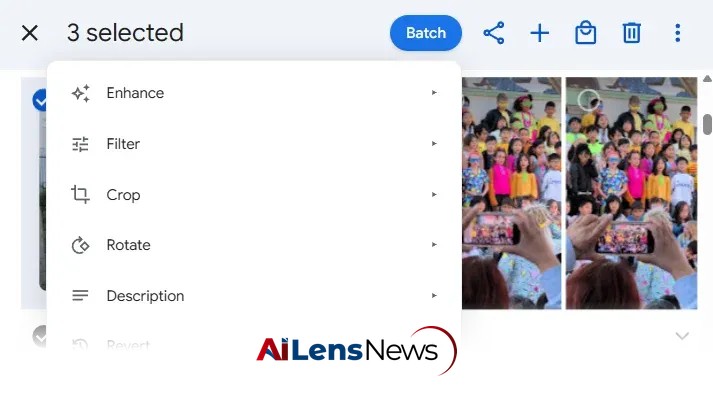


Discover how the new Batch extension for Google Photos simplifies bulk image editing, allowing users to apply the same adjustments to multiple photos effortlessly.
Washington DC, United States Jul 25, 2026 ALN: It really is phenomenal how easy it is to edit photos these days. With the advent of sophisticated software and applications, users can enhance their images with just a few clicks. Features such as filters, color correction, cropping, and retouching have become accessible to everyone, from professional photographers to casual smartphone users. However, despite the myriad of photo-editing options available, one seemingly simple feat remains oddly out of reach for many: the ability to edit multiple images together in bulk and apply the same adjustments to a series of photos simultaneously.
Google Photos has long been regarded as a gold standard for easy and effective image management and editing. The platform offers a user-friendly interface, seamless integration with other Google services, and a robust set of editing tools. Yet, it has been criticized for lacking the capability to perform bulk edits—a feature that many users have been eagerly anticipating. This limitation can be particularly frustrating for those who frequently work with large batches of photos, such as event photographers, social media managers, and anyone looking to streamline their photo management process.
Today, a significant development has emerged that promises to address this gap in functionality. A new tool has been introduced that enhances the Google Photos experience by allowing users to edit multiple images at once, significantly improving efficiency and saving time. This tool, aptly named Batch, is designed to integrate seamlessly into the existing Google Photos web interface, eliminating the need for users to learn new software or navigate different platforms.
The primary function of Batch is straightforward: it adds a "Batch" button to the Google Photos web interface, enabling users to apply the same edits to multiple images simultaneously. This feature is particularly beneficial for those who wish to maintain consistency across a series of photos, whether for personal albums, professional portfolios, or social media posts. With Batch, users can make adjustments such as cropping, rotating, applying filters, and more, all in one swift action.
Using Batch is designed to be intuitive and requires minimal active effort. Users can install the Batch extension for Chrome or any other Chromium-based desktop browser. Once installed, the process is as simple as selecting the desired photos within the Google Photos website and clicking the "Batch" button that appears at the top-right of the screen. This user-friendly approach ensures that even those with limited technical skills can take advantage of the powerful editing capabilities that Batch offers.
Upon clicking the Batch button, a menu will pop up, allowing users to choose from the various image enhancement options available within Google Photos. After selecting the desired edits, users can sit back and watch as Batch processes each image one by one, applying the chosen adjustments automatically. This not only saves time but also ensures that all selected images maintain a cohesive look, which is particularly important for projects requiring a uniform aesthetic.
Once the editing process is complete, users receive a notification indicating that the edits have been successfully applied. The edited images remain in the user's regular Google Photos library, and should any adjustments need to be reversed, users can utilize the standard undo command within Google Photos, just as they would with any individual image edit. This seamless integration reinforces the ease of use that Batch aims to provide.
One of the standout features of Batch is its commitment to user privacy and data security. The tool operates entirely within the user's browser, meaning that none of the data is uploaded to external servers or accessible by third parties. Batch simply acts as an intermediary that facilitates the editing process without compromising the user's privacy. This is an important consideration in an age where data security is a growing concern for many individuals.
In addition to its bulk editing capabilities, Batch also offers the functionality to convert motion photos into standard still images in bulk. This feature can significantly reduce the file size of photos—by as much as 80%—helping users save valuable storage space in their Google Photos accounts. This is particularly advantageous for those who often capture high-resolution images or videos that can quickly consume available storage. Furthermore, Batch allows users to save their own custom presets for both batch editing and storage-saving actions, making future use even more efficient.
Batch operates within the standard Google Photos website through a Chrome browser extension, which is also compatible with other Chromium-based browsers like Edge, Brave, and Vivaldi. The tool is available for free, allowing users to edit up to 25 images per month. For those who require more extensive capabilities, a paid option is available for $7, which increases the limit to 500 images per month. This tiered pricing structure ensures that both casual users and professionals can find a suitable option that meets their needs.
Importantly, there is no requirement for users to create an account to access the free tier of Batch. This means that the service does not collect any personal data or tracking information, allowing users to enjoy the benefits of bulk editing without the hassle of registration or privacy concerns.
In conclusion, the introduction of Batch for Google Photos marks a significant advancement in photo editing capabilities, particularly for users who frequently handle large quantities of images. The ability to perform bulk edits not only enhances efficiency but also allows for greater consistency in visual presentation. As digital photography continues to evolve, tools like Batch will be essential for helping users manage their growing collections of images effectively. Moreover, the focus on user privacy and data security further solidifies Batch as a valuable addition to the Google Photos ecosystem, making photo editing an even more accessible and enjoyable experience for everyone.
As users explore the potential of Batch, they may also want to consider complementary tools that can further enhance their photo editing experience. For instance, there are existing applications that handle basic bulk image edits, such as resizing, watermark removal, and location data management, which can serve as a powerful one-two punch alongside Batch. By leveraging these tools, users can maximize their efficiency and creativity in managing their photo collections.
Overall, Batch is poised to revolutionize the way users approach photo editing, making it easier than ever to enhance multiple images at once while keeping their workflow streamlined and efficient.
To learn more about the latest developments in Software & Platforms, stay updated with our exclusive reports and analyses on AiLensNews.